Pay with your Step Up scholarship
A click-by-click guide for the Step Up parent portal. Reading Adventure Worlds is an approved Step Up provider.

Approved Step Up provider
Reading Adventure Worlds is listed in the Step Up For Students marketplace (EMA) under our company name, Crown Oak Learning LLC. Florida families can use eligible scholarship funds, such as PEP or FES-UA, to pay the $9.99 a month membership for each reader. Paying with a Step Up For Students scholarship? Buy through the Step Up marketplace instead: no card needed. Prefer to pay once? See School Year Plan and Lifetime Access.
Before you start
- Create your grown-up account (no card needed) and set up your reader first, so we know which account to unlock.
- Your Step Up parent login for apply.stepupforstudents.org. Keep your password private. We will never ask for it.
- About 5 minutes, ideally on a computer or tablet. One order per reader: repeat the steps under each student.
Provider to searchCrown Oak Learning
LocationCrown Oak Learning LLC - Cape Coral
ServiceTuition: Reading Adventure Worlds
Rate and quantity$9.99 / Month · quantity 1
Open the Step Up parent portal
How to pay with your Step Up scholarship
Early Black Friday (through Cyber Monday, Nov 30): the sale prices (50% off everything: $4.99 for your first month of Monthly, $50 for your first School Year and $150 for Lifetime Access) are for card checkout on our website. Orders through the Step Up marketplace stay at the regular price. Want the sale price? Pay by card and request reimbursement in your EMA account (Step Up reviews each request).
Do one numbered step at a time. Each screenshot has one red arrow with the matching number that shows exactly where to click.
-
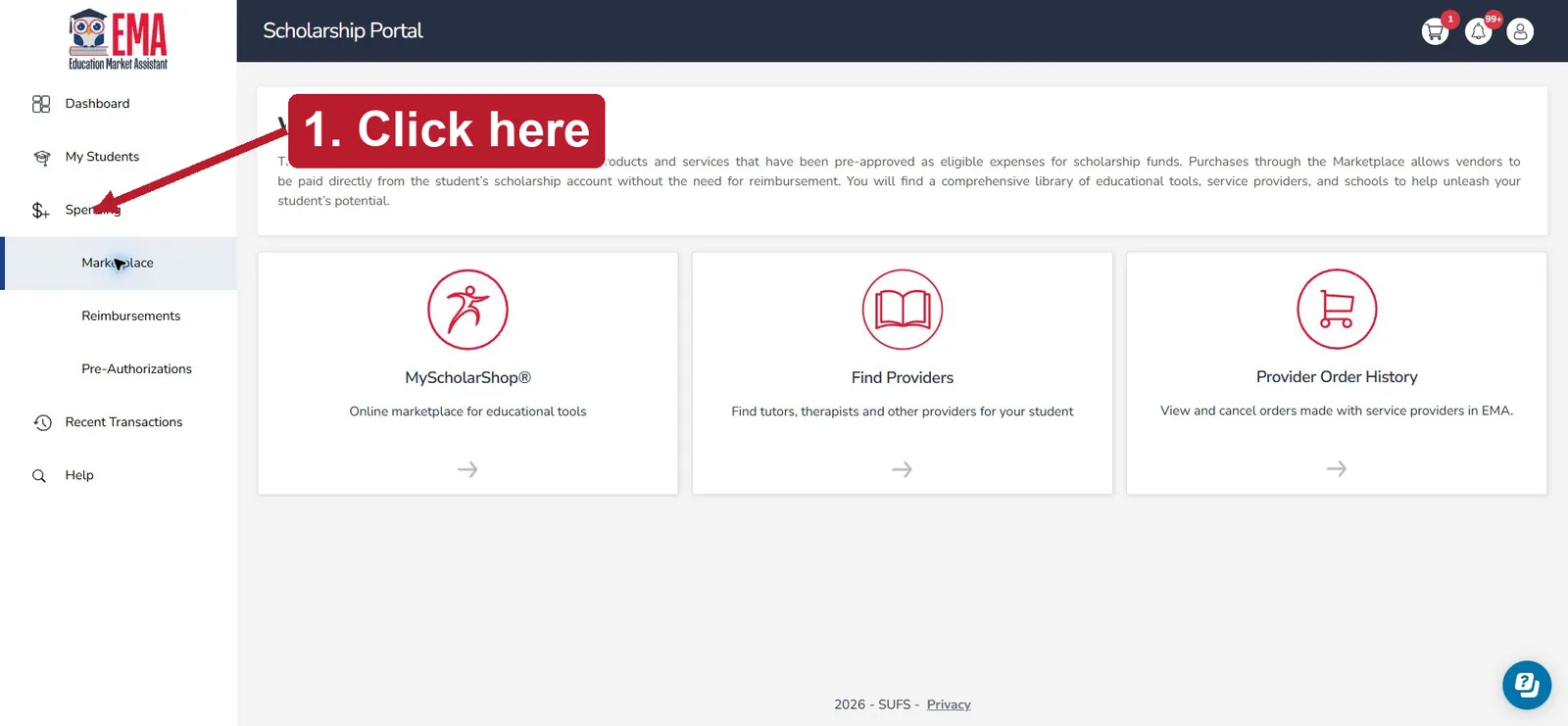
1Click Spending
Log in at apply.stepupforstudents.org with your existing parent account. Check that the page says Scholarship Portal. Click Spending in the left menu.
Tap the screenshot to enlarge. -
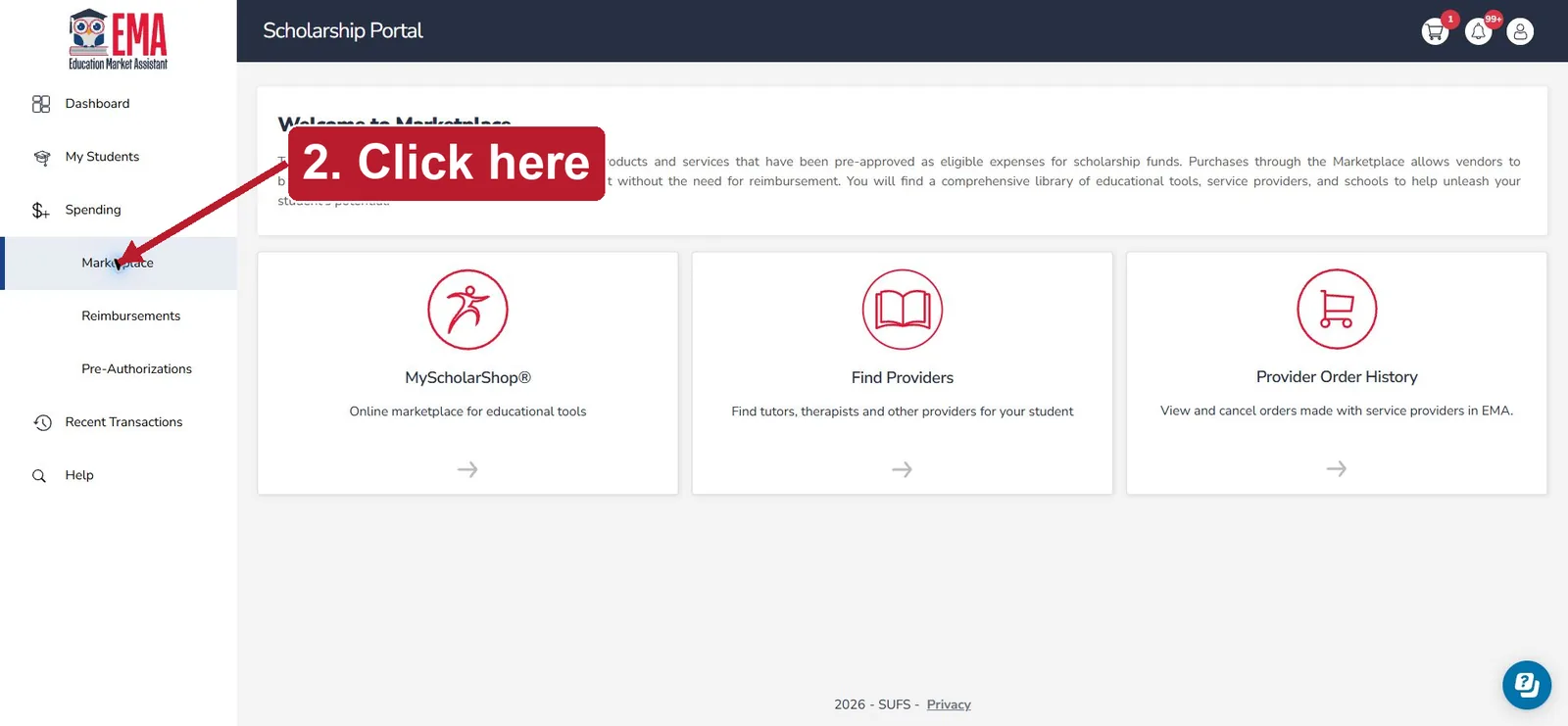
2Click Marketplace
Under Spending, click Marketplace.
Tap the screenshot to enlarge. -
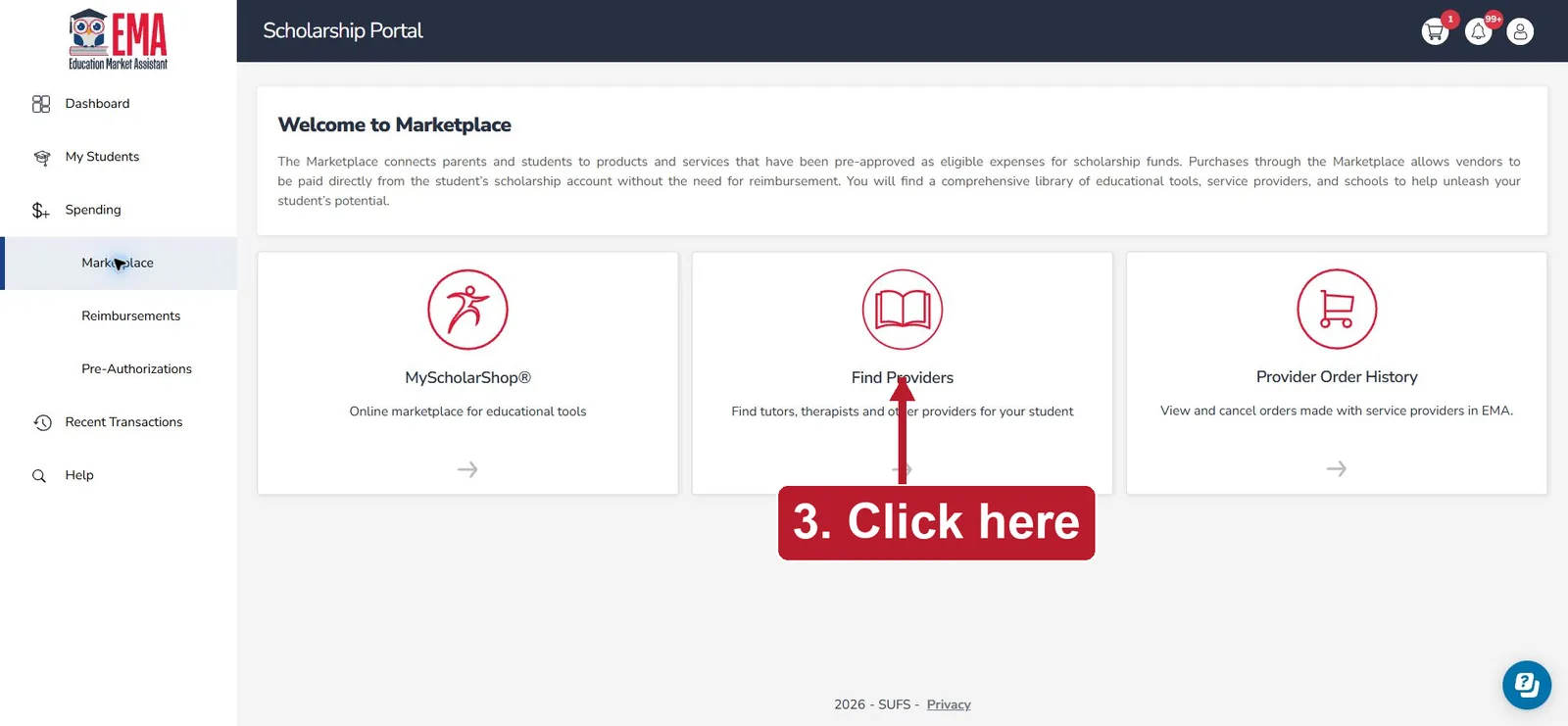
3Click Find Providers
Click the middle tile, Find Providers. The tiles on either side are shown so you can be sure you picked the right one.
Tap the screenshot to enlarge. -
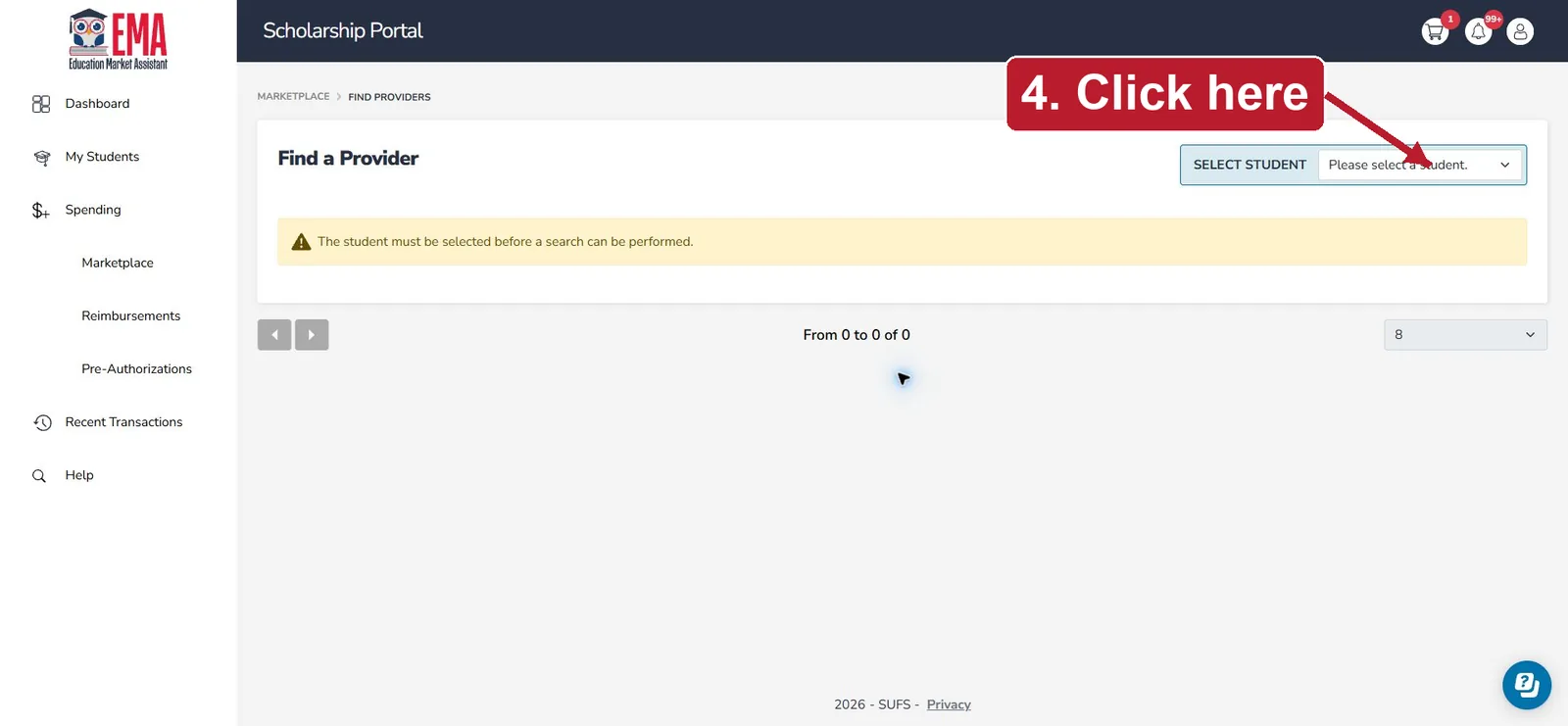
4Select your student
Click the Select Student dropdown at the top right and choose the child who will use Reading Adventure Worlds.
Tap the screenshot to enlarge. -
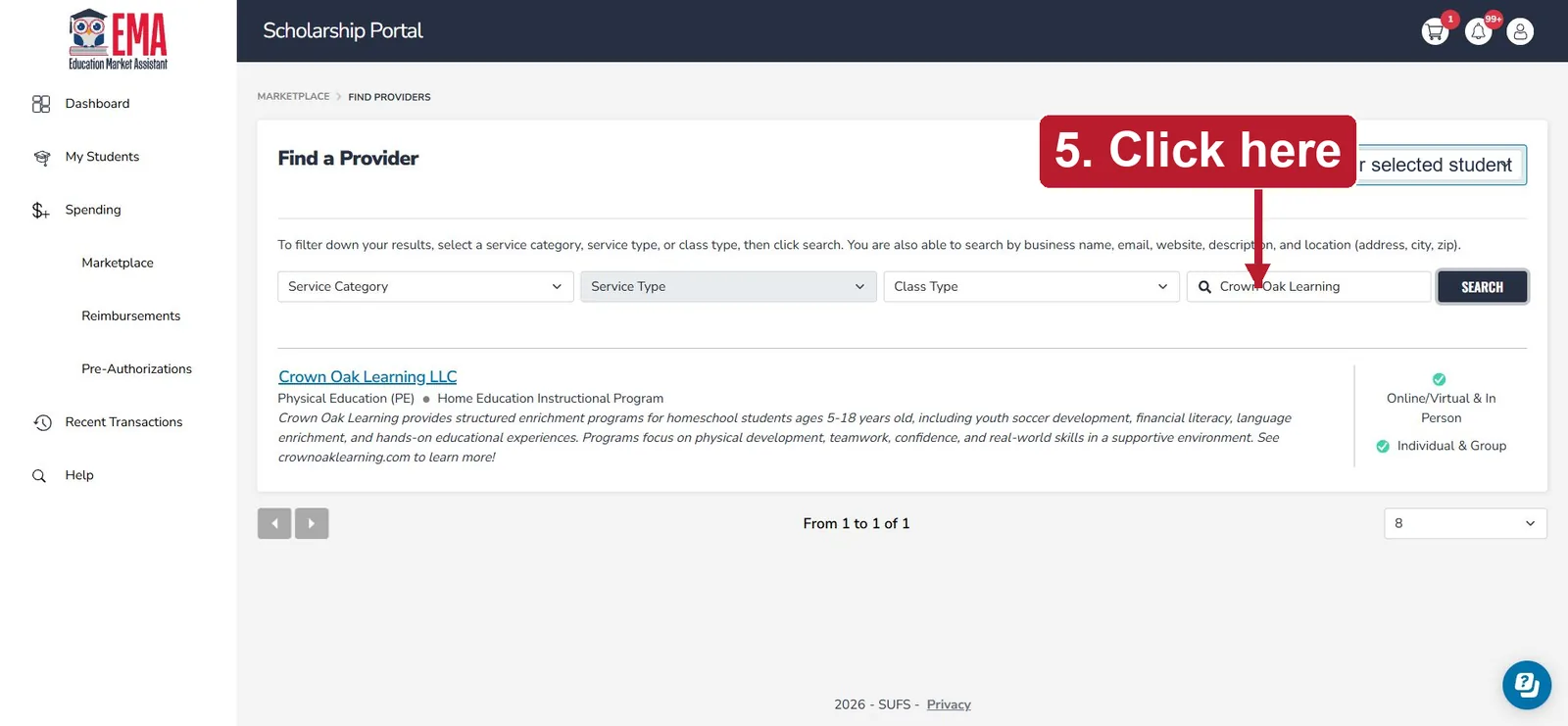
5Type Crown Oak Learning
Click the search box and type Crown Oak Learning. Leave the other filters blank.
Tap the screenshot to enlarge. -
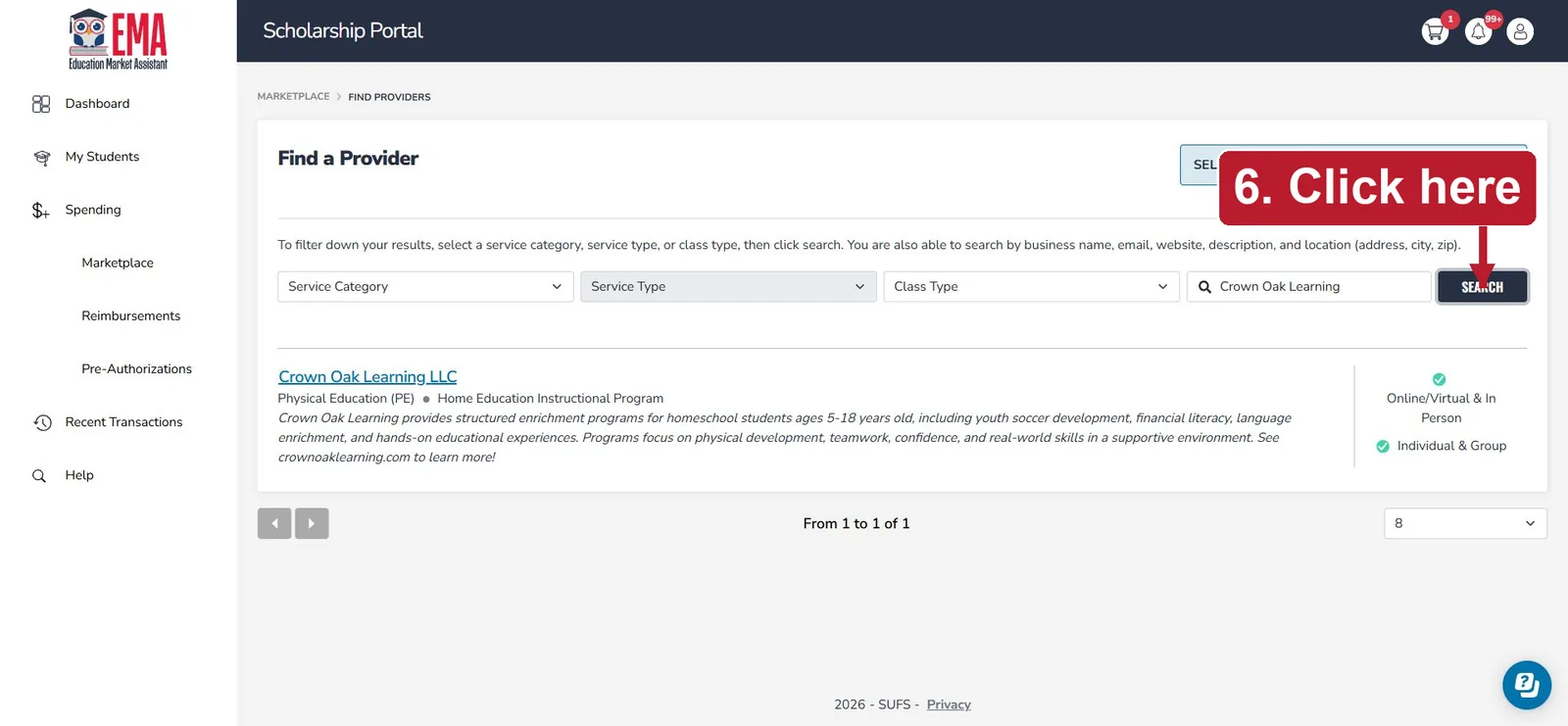
6Click SEARCH
Click SEARCH to find the provider.
Tap the screenshot to enlarge. -
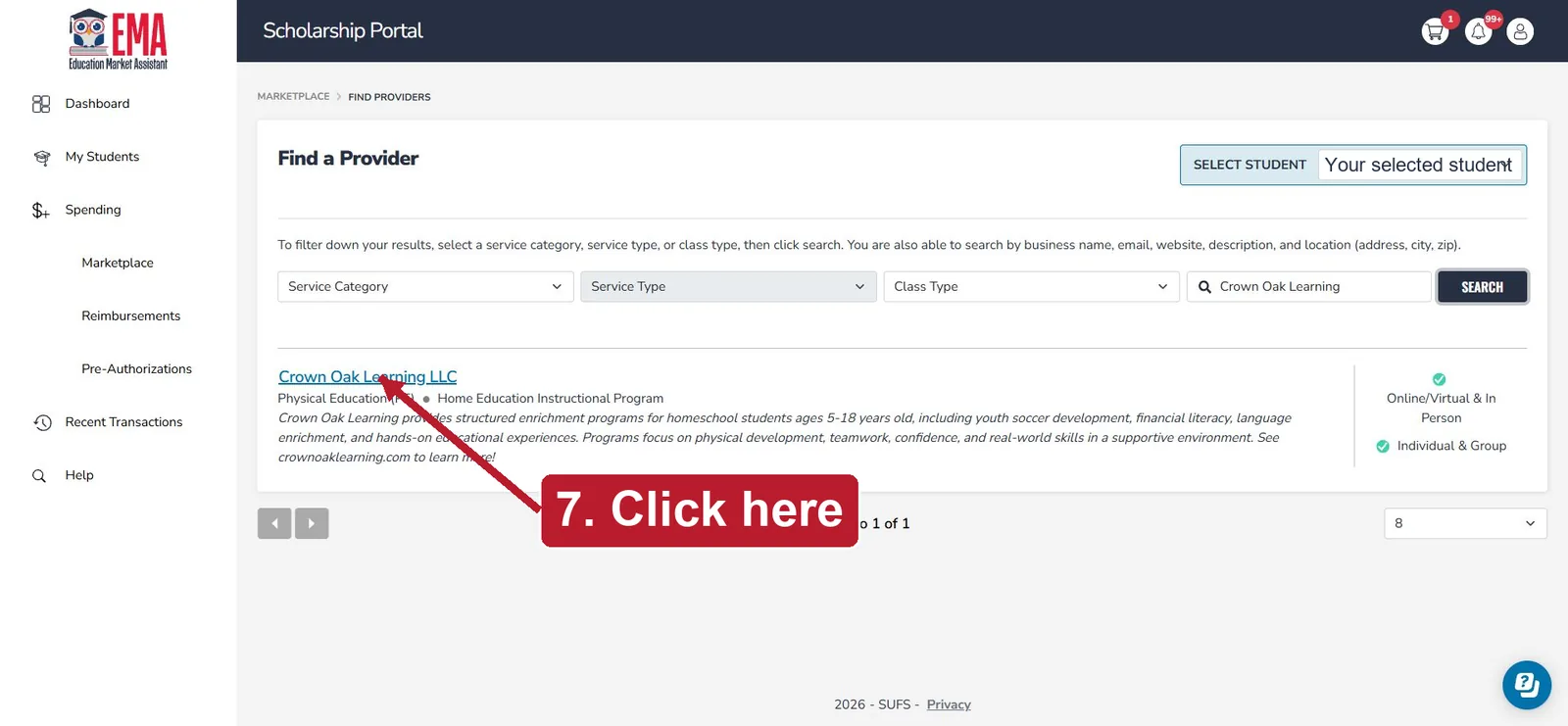
7Open Crown Oak Learning LLC
Click the Crown Oak Learning LLC provider name in the results. Reading Adventure Worlds is sold under this company name.
Tap the screenshot to enlarge. -
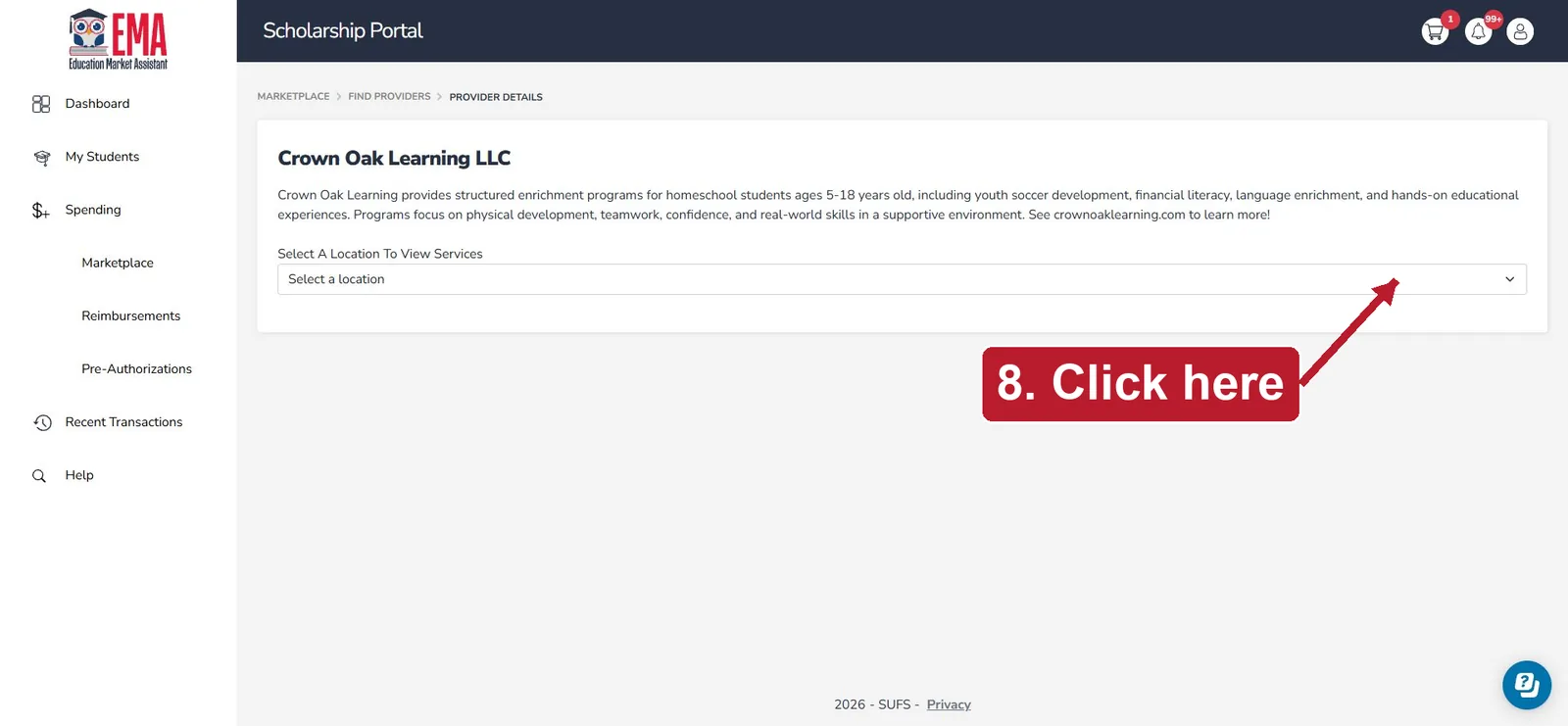
8Select the Crown Oak location
Open Select a location, then choose Crown Oak Learning LLC - Cape Coral to see the services.
Tap the screenshot to enlarge. -
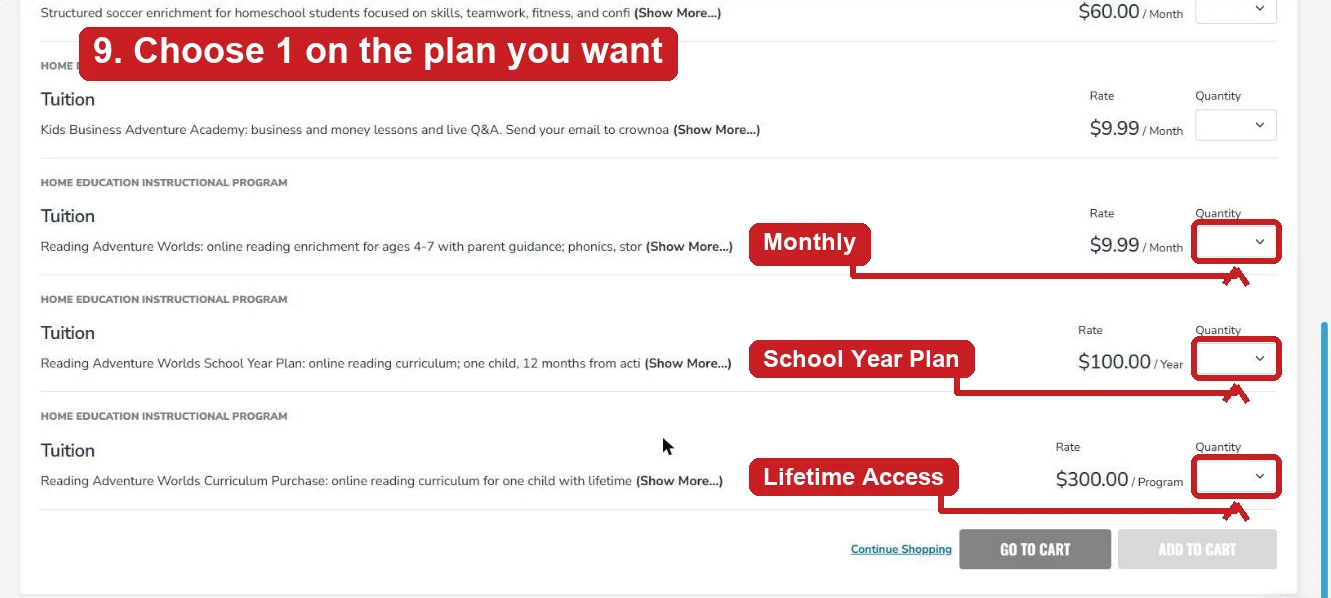
9Choose quantity 1 for Reading Adventure Worlds
Scroll to Home Education Instructional Program → Tuition. Find the Tuition line whose description says Reading Adventure Worlds and pick the plan you want by its rate: $9.99 / Month (monthly), $100.00 / Year (School Year Plan, 12 months) or $300.00 / Program (Lifetime Access). Open that line’s quantity dropdown and choose 1. Leave every other line blank.
Tap the screenshot to enlarge. -
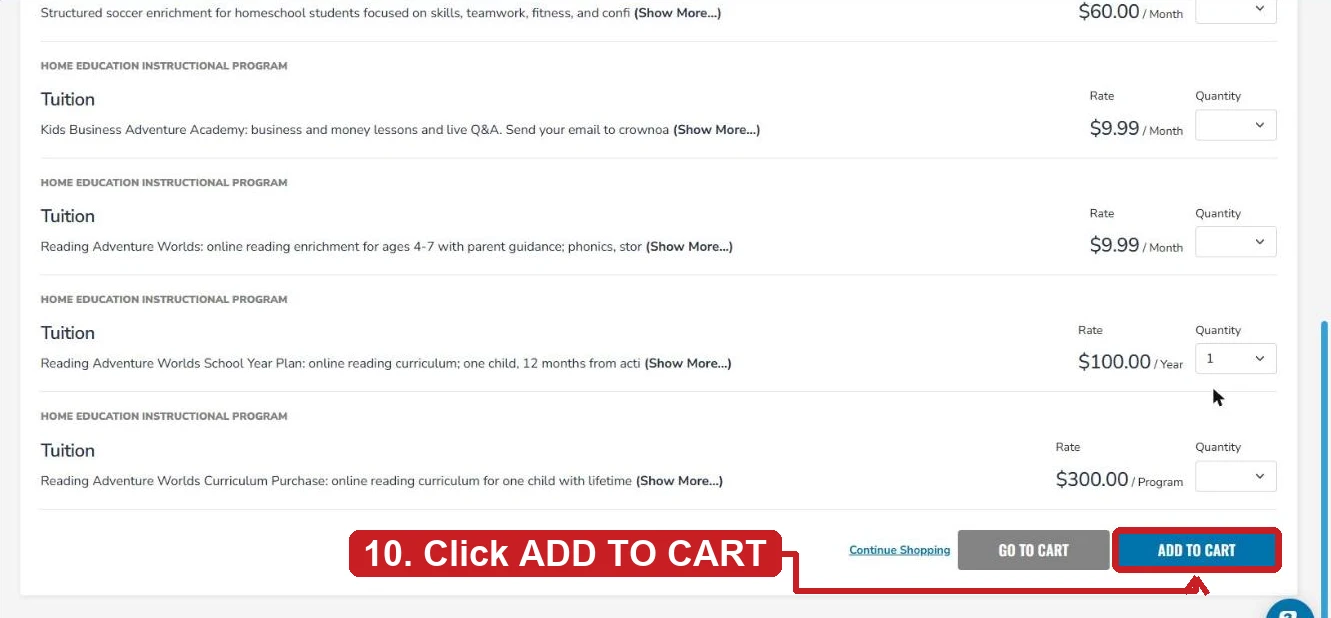
10Click ADD TO CART
Click ADD TO CART to add the Reading Adventure Worlds tuition line to your cart.
Tap the screenshot to enlarge. -
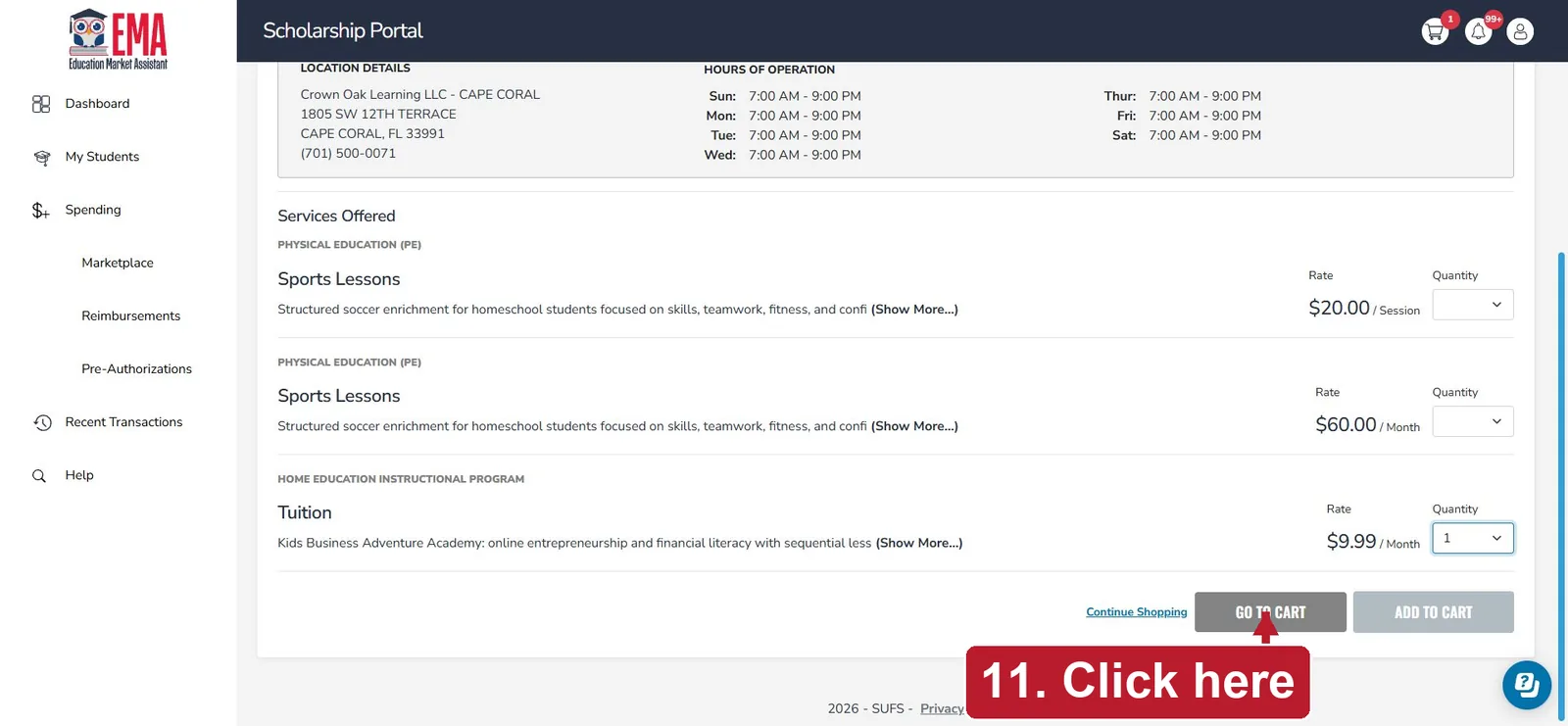
11Click GO TO CART
After the item is added, click GO TO CART.
Make sure the line you chose in step 9 says Reading Adventure Worlds.
Tap the screenshot to enlarge. -
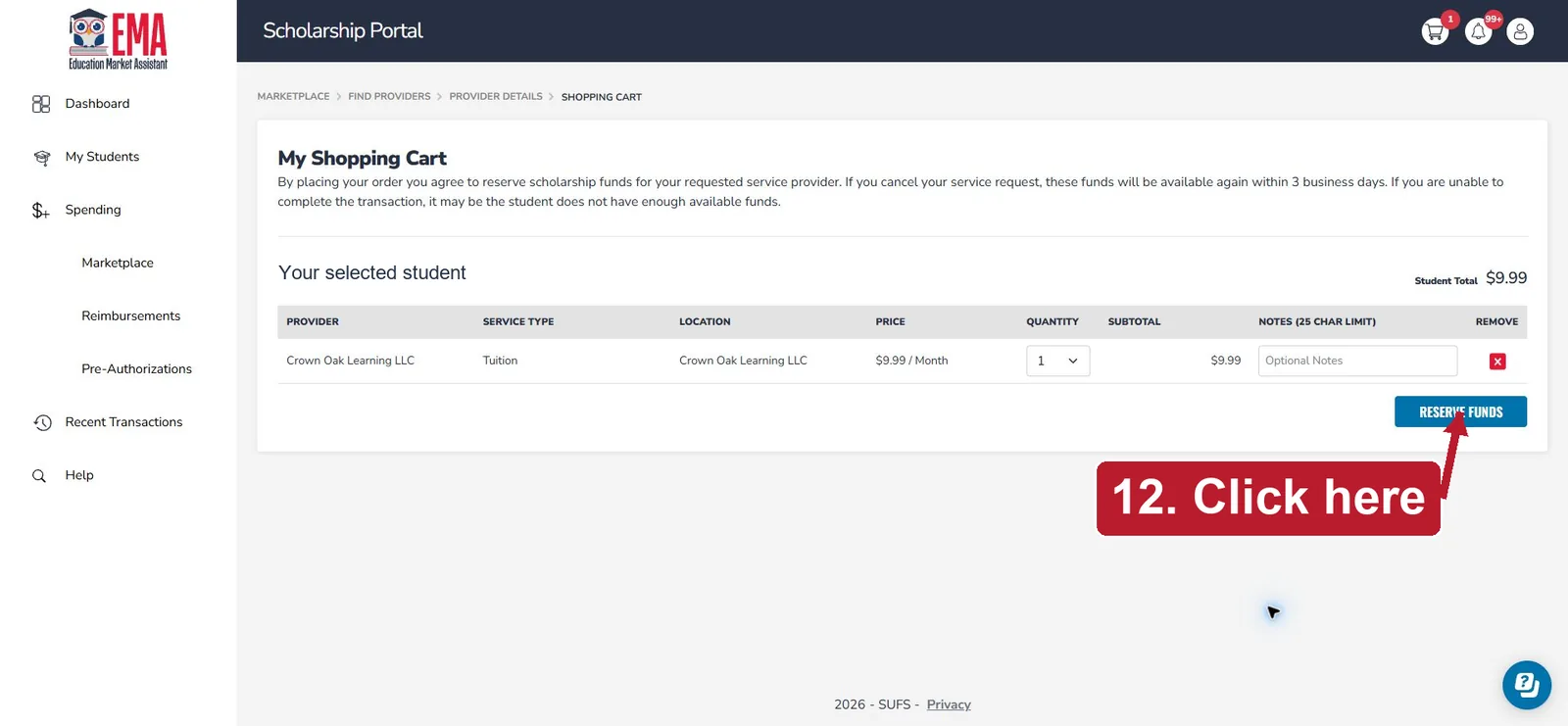
12Check the cart, then click RESERVE FUNDS
Make sure you see the correct student, Crown Oak Learning LLC, Tuition, quantity 1 and a $9.99 subtotal. Read EMA’s notice, then click RESERVE FUNDS when you’re ready. Follow any confirmation prompts.
Tap the screenshot to enlarge. -
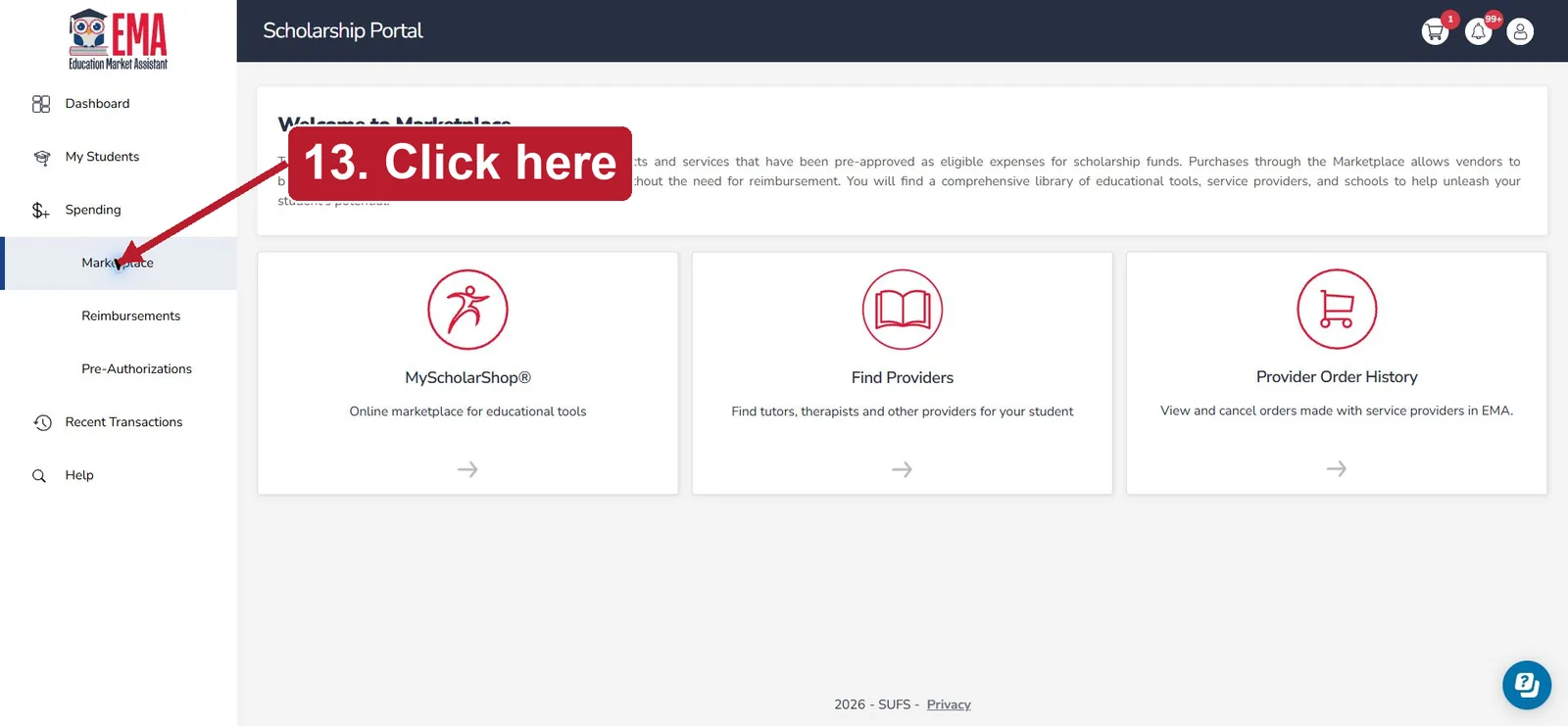
13Go back to Marketplace
When the reservation prompts are finished, click Marketplace in the left menu.
Tap the screenshot to enlarge. -
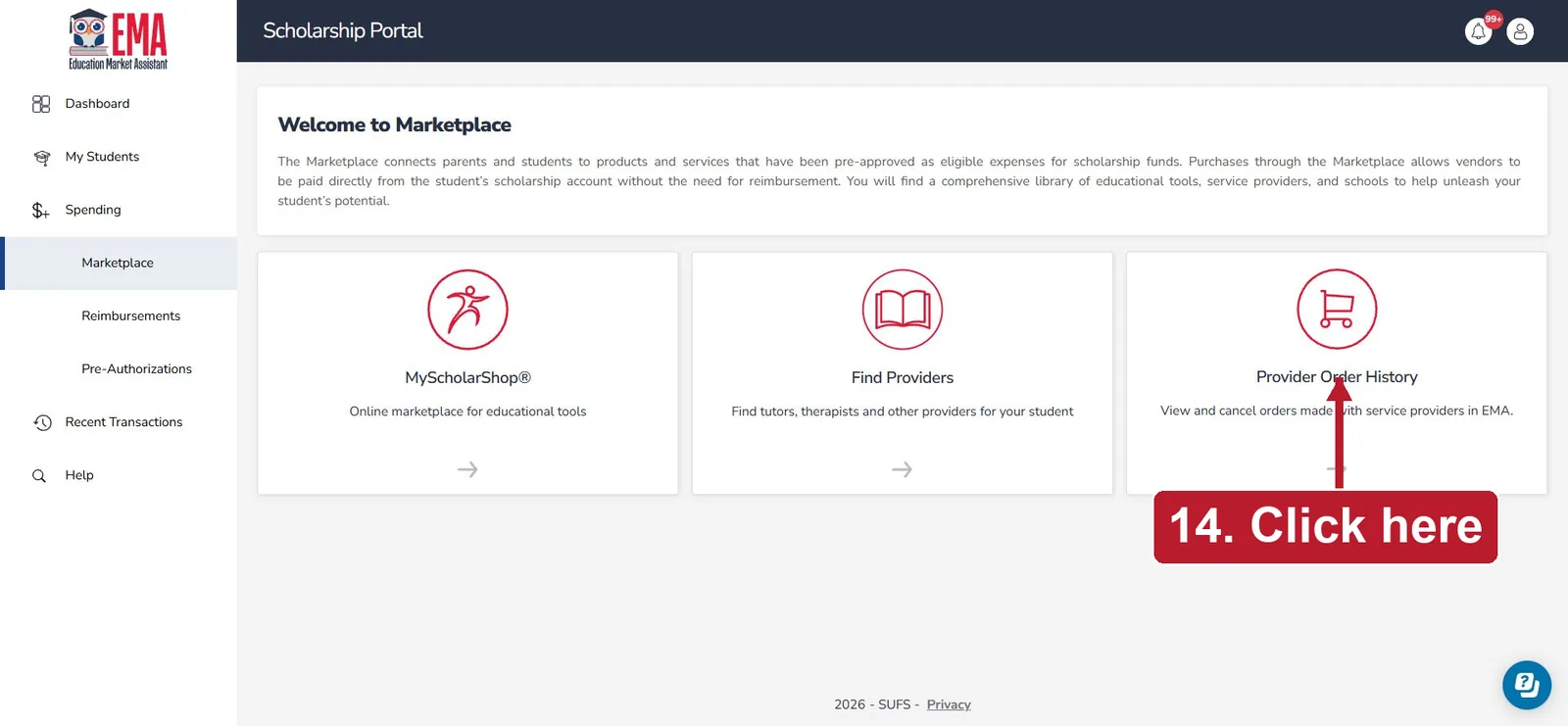
14Click Provider Order History
Open Provider Order History to check your order and copy its reference. Then email it to us with your account email (see “What happens next” below). Follow any EMA instructions to approve an invoice.
Tap the screenshot to enlarge.
What happens next
Send us your reference
Email your order reference and your account email to crownoaklearning@gmail.com.
We verify the order
Reserving funds does not unlock worlds by itself. We check the reserved order (student, service, quantity and amount) in the portal.
We unlock every lesson
Once it’s verified, we unlock every lesson in your account and email you.
About access and renewals
- Availability depends on your student’s scholarship eligibility and available funds, which Step Up For Students decides.
- Lessons unlock after Crown Oak verifies your reserved order. Instant activation isn’t available for scholarship orders yet.
- Please don’t also start a card trial or card membership for the same reader and period. If it happens, tell us and we’ll refund the duplicate card payment.
- Check EMA for renewal steps. Automatic monthly renewal through EMA has not been confirmed, so you may need to place a new order to continue.
Prefer to pay once? School Year Plan and Lifetime Access
Good news: all three plans are now approved in the Step Up EMA marketplace. Use the steps above, and at step 9 choose quantity 1 on the Crown Oak Learning LLC tuition line you want: $9.99 / Month (monthly), $100.00 / Year (School Year Plan, 12 months) or $300.00 / Program (Lifetime Access). No card needed, and no monthly re-orders for the one-time plans. We switch your plan on after the order comes through.
Prefer to pay by card? You can also buy the School Year Plan or Lifetime Access by card and ask for reimbursement in your own EMA account:
Buy by card
Choose the School Year Plan ($100 a year after a 7-day free trial, renews yearly until you cancelEarly Black Friday: $50 your first year after a 7-day free trial, then $100 a year until you cancel) or Lifetime Access ($300Early Black Friday: $150, normally $300, paid today, no trial, for as long as Reading Adventure Worlds operates) when you sign up, or from Grown-ups in the app. Your receipt is ready once your card is charged.
Download your documents
In the app, open Grown-ups → Receipts and choose Download scholarship purchase documents: your receipt, a curriculum description and our fee schedule.
Request reimbursement
Submit them in your own EMA account as a reimbursement request, following Step Up’s PEP Purchasing Guide.
Please know before you buy
- All three plans are approved in the EMA marketplace under Crown Oak Learning LLC. Step Up decides each student’s eligibility and available funds.
- If you pay by card instead, the reimbursement request is subject to your program’s rules and Step Up review.
- We don’t submit requests for you and can’t see your EMA account. If a request is denied, your plan stays active and our Refund & Cancellation Policy applies to the card payment.
- Prices are per child. EMA orders don’t renew automatically. A School Year Plan bought by card renews every year until you cancel in Grown-ups → Cancel membership. Lifetime Access never renews. No refunds. See our Scholarship Purchase Terms.
What the scholarship covers
- Step-by-step phonics: letter sounds, blending, word building and decodable stories
- Handwriting and letter-tracing practice
- Sound, word and writing games, letter videos and an alphabet singalong
- Fifteen worlds and a lesson trail that saves your reader’s progress
Questions?
Email us and a real person will help, usually within 1 business day.
Reading Adventure Worlds and Crown Oak Learning LLC are not affiliated with or endorsed by Step Up For Students. Screenshots of the Step Up portal were checked September 18, 2026; student names are hidden, and screens can change. Program rules can change, so check your Step Up account for the latest requirements. See our Scholarship Purchase Terms.